

Trumouse Lite: External Interfaces and Ports
See Figure “Trumouse Lite interface locations (viewed from the right front)” for the location of the interfaces on the system and Table “Interfaces and ports” for their specifications.
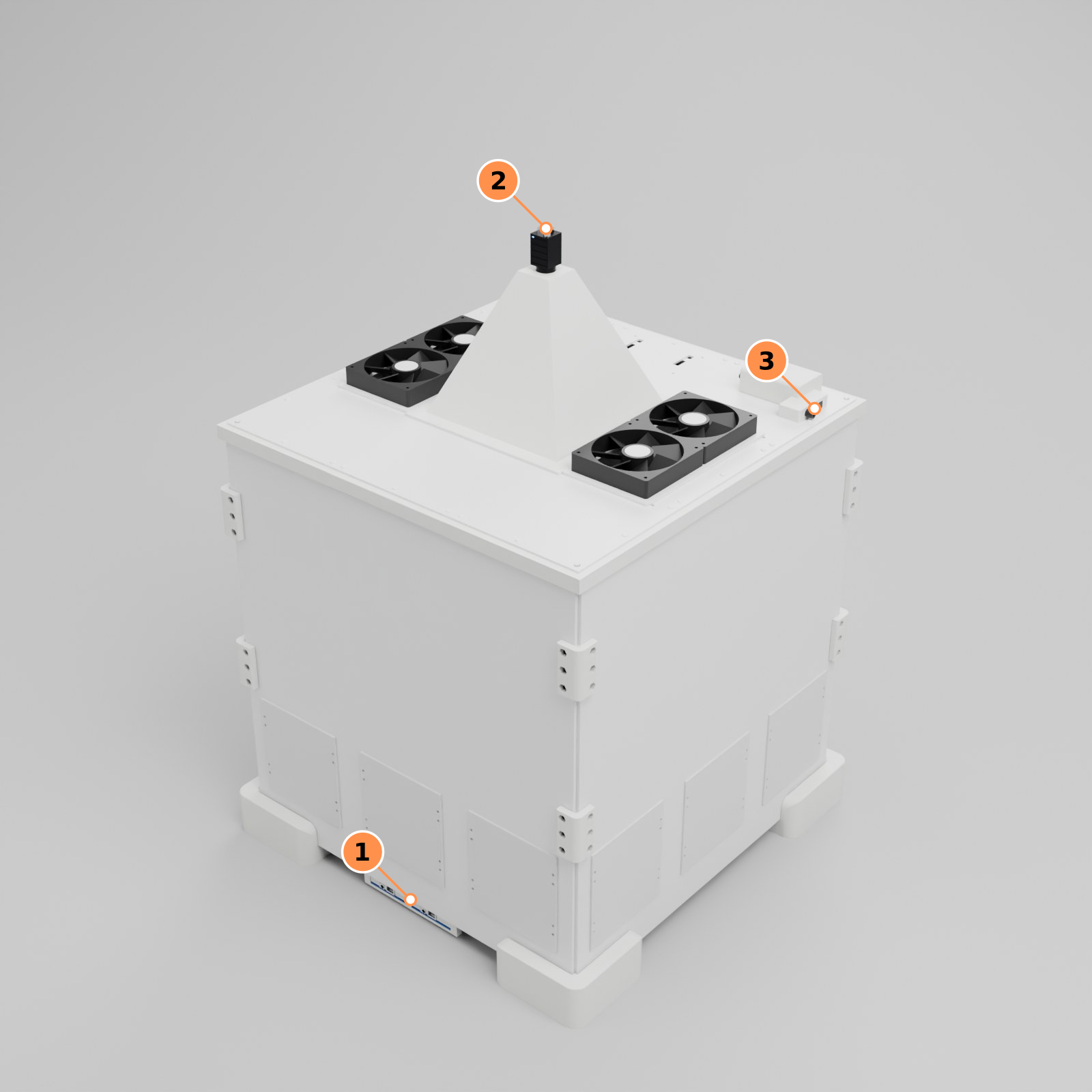
Figure: Trumouse Lite interface locations (viewed from the right front)
- Reader Array: network ports and DC power inputs, on the edge of the block below the side panel.
- Industrial Camera: network port and DC power input.
- Top Panel: DC power input and network port.
Table: Interfaces and ports
| Port | Location | Purpose | User accessible |
|---|---|---|---|
| DC power input, 5 V × 2 | Reader Array, 2 per block | Reader Array power | Yes |
| DC power input, 12 V or 24 V | Industrial Camera | Industrial Camera power (can also be powered with the Top Panel lighting) | Yes |
| DC power input, 24 V | Top Panel | Power for the White Light, Infrared Light, environmental sensor, Light Control Module and Exhaust Fan | Yes |
| RJ45 Ethernet × 2 | Reader Array, 2 per block | Reader Array data output to the switch | Yes |
| RJ45 Ethernet | Industrial Camera | Camera data, connection to the switch | Yes |
| RJ45 Ethernet × 1 (PoE network port) | Top Panel, Light Control Module | Connects the lighting control and environmental sensor to the switch | Yes |